
In This Article
When you’re working from a Victorian terrace conversion or a modern city flat, every centimetre counts. I’ve spent years testing workspace solutions, and the sweet spot for genuinely compact desks sits right around 80cm wide—narrow enough to squeeze into hallways or bedroom corners, yet surprisingly functional for full-time work.
The UK housing market hasn’t exactly been generous with space lately, has it? According to HSE guidelines on home office ergonomics, a proper workstation needn’t be enormous to meet Display Screen Equipment regulations. What matters most is appropriate height, adequate depth for your monitor, and sufficient legroom—all achievable in an 80cm footprint. This guide explores seven exceptional computer desks under 80cm wide currently available on Amazon.co.uk, each carefully selected for UK homes where space is precious but productivity can’t be compromised. Whether you’re setting up a hot desk in your spare room or creating a permanent workspace under the stairs, you’ll find options that actually work.
Quick Comparison Table
| Desk Model | Width | Price Range | Best Feature | Ideal For |
|---|---|---|---|---|
| VASAGLE Mobile LCD858B | 80cm | £60-£75 | Sliding keyboard tray | Traditional PC users |
| Flrrtenv X-Frame | 80cm | £45-£60 | Industrial design | Minimalist aesthetics |
| Harbour Housewares Folding | 80cm | £35-£50 | Folds to 10cm | Multi-purpose rooms |
| HOOBRO with Power Outlet | 80cm | £55-£70 | Built-in charging | Tech-heavy setups |
| Furnica BILLY | 80cm | £40-£55 | Multiple colours | Budget-conscious buyers |
| MCC Direct Miami | 80cm | £30-£45 | No assembly required | Quick setup needs |
| Oypla Industrial | 80cm | £25-£35 | Heavy-duty steel | Maximum value |
💬 Just one click – help others make better buying decisions too! 😊
Top 7 Computer Desks Under 80cm Wide: Expert Analysis
1. VASAGLE Mobile Computer Desk LCD858B – Best Overall for Flexibility
The VASAGLE Mobile Computer Desk LCD858B represents excellent value in the compact desk market. Measuring precisely 80 x 48 x 76cm, this mobile workstation combines functionality with genuine portability—something rarely achieved at this price point.
Key Specifications:
- Sliding keyboard tray for ergonomic typing
- Four castors (two with brakes) for easy repositioning
- Corner shelf accommodates hard drives or peripherals
- Sturdy particleboard top with powder-coated steel frame
Current UK pricing sits around £60-£75, and customer feedback consistently highlights the straightforward assembly process. One British reviewer noted: “Plenty of leg room despite my height, and the castors move beautifully across both carpet and laminate.” The keyboard tray isn’t merely decorative—it genuinely helps maintain proper wrist alignment according to ergonomic workplace guidelines.
✅ Pros:
- Genuinely mobile without sacrificing stability
- Keyboard tray reduces desk clutter
- Corner shelf cleverly utilises dead space
❌ Cons:
- Castors may leave marks on softer wood floors
- Limited desktop depth for dual monitor setups
2. Flrrtenv 80cm Computer Desk – Best Industrial Aesthetic
If you’re after that trendy warehouse-conversion look without the warehouse-conversion prices, the Flrrtenv 80cm Computer Desk delivers admirably. The X-shaped metal frame isn’t just for show—it provides genuine structural rigidity whilst keeping the visual profile light.
Key Specifications:
- Dimensions: 80W x 40D x 74H cm
- High-quality MDF board with waterproof coating
- X-braced steel frame with adjustable feet
- Available in multiple finishes (Rustic Brown, Modern Black, White)
Amazon.co.uk lists this between £45-£60, making it remarkably accessible for what you’re getting. UK customers appreciate that it accommodates modern work-from-home setups: “Great little desk and just what I was looking for. Easy to put together, and nice and sturdy. Definitely value for money.” The adjustable feet prove particularly useful in older UK properties where floors aren’t always perfectly level.
✅ Pros:
- Contemporary design suits modern interiors
- Waterproof surface handles coffee spills
- Lightweight yet stable construction
❌ Cons:
- 40cm depth may feel cramped with large monitors
- Assembly requires two people for easier installation
3. Harbour Housewares Deluxe Folding Desk – Best Space-Saving Solution
For those who genuinely need their space back when work finishes, the Harbour Housewares Deluxe Folding Desk folds to just 10cm thick—narrower than most laptops. This British brand understands UK housing constraints intimately.
Key Specifications:
- Folds from 80 x 45 x 74.5cm to approximately 80 x 10cm
- Three-piece reinforced steel framework
- Available in Black, White, Lilac, Natural wood finishes
- Melamine-faced worktop resists daily wear
Currently priced at £35-£50 on Amazon.co.uk, this represents exceptional value for a folding mechanism that actually feels robust. One customer review captured its appeal perfectly: “Bought the Harbour Housewares desk, and it’s like having a proper workspace that disappears when you need your dining room back.” The range of colour options—including that cheerful Lilac—helps it blend into various UK interior styles from traditional to contemporary.
✅ Pros:
- Genuinely space-saving folding design
- Multiple colour options suit different décors
- Steel frame ensures stability when deployed
❌ Cons:
- Folding/unfolding becomes tedious for daily use
- Slightly smaller depth than fixed alternatives
4. HOOBRO Computer Desk with Power Outlet – Best for Tech Integration
Modern work involves multiple devices, and the HOOBRO Computer Desk with Power Outlet acknowledges this reality with integrated charging solutions. This 80cm model includes 2 AC sockets and 2 USB ports built directly into the desk.
Key Specifications:
- Integrated power: 2 outlets + 2 USB ports
- 3 removable hooks for headphones/bags
- Particleboard top with iron framework
- Dimensions: 80L x 40W x 75H cm
Pricing typically ranges £55-£70, which represents solid value considering the integrated electrics. UK buyers appreciate not needing separate power strips cluttering their limited desk space. According to customer feedback: “The built-in sockets are brilliant—no more crawling under desks to plug in my laptop charger.” The removable hooks prove surprisingly useful for keeping bags and headsets accessible yet out of the way.
✅ Pros:
- Integrated charging eliminates cable chaos
- Three hooks maximise vertical storage
- Adjustable feet compensate for uneven floors
❌ Cons:
- Power outlet positioned at back requires careful cable management
- Slightly higher price point than basic models
5. Furnica BILLY Computer Desk – Best Colour Selection
The Furnica BILLY Computer Desk offers something increasingly rare: genuine colour choice. Available in Alder, Sonoma Oak, Wenge, and White Matt, this 80cm desk lets you match existing furniture properly.
Key Specifications:
- Dimensions: 80W x 50D x 74H cm
- 16mm chipboard construction
- Pull-out keyboard tray included
- Multiple finish options for coordination
Amazon.co.uk pricing sits around £40-£55, positioning it firmly in the budget-conscious bracket without feeling cheap. The keyboard tray adds surprising functionality—UK customers report it genuinely helps with wrist positioning during extended typing sessions. As one reviewer noted: “The Sonoma Oak finish looks far more expensive than it actually cost. Colleagues on video calls always ask where I bought it.” The 50cm depth provides more breathing room than the narrower 40cm models.
✅ Pros:
- Excellent colour range matches existing furniture
- 50cm depth accommodates larger monitors
- Keyboard tray improves ergonomics
❌ Cons:
- Assembly instructions could be clearer
- Keyboard tray mechanism occasionally sticks
6. MCC Direct Miami Folding Desk – Best for Zero Assembly
If you’re absolutely dreading the assembly process, the MCC Direct Miami Folding Desk arrives completely pre-assembled. Simply unfold the legs, and you’re ready to work within seconds.
Key Specifications:
- No assembly whatsoever required
- Foldable design for storage
- Available in Natural, Black, Distressed Grey
- Sturdy construction despite fold-away design
Typically priced £30-£45 on Amazon.co.uk, this represents outstanding value for anyone who’s ever spent three hours deciphering flat-pack instructions. UK customers particularly appreciate the immediate gratification: “Ordered it Tuesday, arrived Wednesday, working from it by Thursday morning. Brilliant for emergency home office situations.” The distressed grey finish hides minor scratches and wear remarkably well—ideal for households with children or pets.
✅ Pros:
- Absolutely zero assembly required
- Folds for convenient storage
- Budget-friendly pricing
❌ Cons:
- Less customisation in setup
- Folding hinges may loosen over extended use
7. Oypla Industrial Writing Desk – Best Budget Option
For maximum value without sacrificing essential quality, the Oypla Industrial Writing Desk delivers surprising robustness at an entry-level price. This 80cm model features heavy-duty steel construction that belies its modest cost.
Key Specifications:
- Dimensions: 80W x 48D x 72.5H cm
- Heavy-duty powder-coated steel frame
- Distressed-effect desktop for industrial style
- Supports up to 30kg weight capacity
- Adjustable rubber feet protect floors
Current Amazon.co.uk pricing sits around £25-£35—genuinely impressive for what you’re receiving. The 30kg weight capacity exceeds many desks costing twice as much. UK customer reviews highlight the unexpected quality: “Bought this expecting basic, but got genuinely sturdy. The powder coating feels premium, and assembly took maybe 20 minutes.” The adjustable feet prove invaluable in older UK properties where floors rarely sit perfectly level.
✅ Pros:
- Exceptional value for money
- Heavy-duty construction exceeds expectations
- Industrial styling suits modern interiors
❌ Cons:
- Limited to 30kg capacity
- Distressed finish won’t suit traditional décor
Essential Considerations When Choosing a Computer Desk Under 80cm Wide
Depth Matters More Than You Think
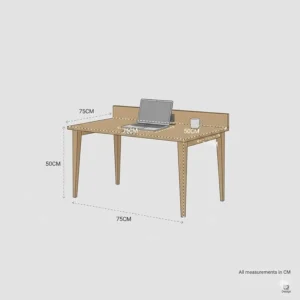
Whilst width defines whether a desk fits your space, depth determines whether it actually works ergonomically. According to BS EN ISO 9241 workplace standards, optimal eye-to-monitor distance sits around 600mm, though 450-750mm proves acceptable for most users. For an 80cm wide desk, prioritise models offering at least 48cm depth—anything less and you’ll find yourself cramped.
Consider your monitor size carefully. A standard 24-inch screen requires approximately 50-60cm viewing distance for comfortable use. Smaller 15-inch laptop displays function adequately at 45cm, but larger 27-inch monitors genuinely need that full 60cm to avoid eye strain during extended work sessions.
Height Adjustment Versus Fixed Positioning
Fixed-height desks typically measure 72-76cm tall, which accommodates approximately 95% of the UK population when paired with appropriate seating. However, if you’re particularly tall or short, this “one-size-fits-most” approach may leave you uncomfortable. HSE guidance on DSE workstations emphasises that achieving proper posture matters more than purchasing expensive furniture.
For fixed-height desks, you can compensate with adjustable chairs and footrests. For standing desk enthusiasts, several 80cm models now offer electric height adjustment, though these typically cost £150+ rather than the £30-£75 range we’re exploring here. If you alternate between sitting and standing regularly, investing in a height-adjustable model makes sense. For occasional standing sessions, a simple desk riser proves more economical.
Material Quality and Longevity
Compact doesn’t mean flimsy—proper material selection ensures your 80cm desk survives years of daily use. Look for these quality indicators:
Desktops: MDF or particleboard with melamine facing provides excellent value whilst resisting moisture and scratches. Avoid plain chipboard without protective coating—it degrades rapidly from spills and general wear. Solid wood offers superior durability but significantly increases cost and weight.
Frames: Powder-coated steel frames offer the best strength-to-weight ratio, particularly with X-bracing or cross-supports. Tubular steel keeps visual bulk minimal whilst providing genuine structural integrity. Some budget models use thinner gauge steel that flexes noticeably under load—check customer reviews mentioning stability.
Joints: Quality desks use threaded inserts and machine screws rather than cam locks and wooden dowels. This difference becomes apparent after 6-12 months of use when budget models begin wobbling.
Storage Integration for Limited Spaces
In compact home offices, vertical storage becomes essential. Several 80cm desks incorporate clever solutions:
Keyboard trays free up desktop real estate whilst improving typing ergonomics. They’re particularly valuable for traditional desktop PC setups where the keyboard would otherwise consume 40cm of your limited depth.
Under-desk shelves accommodate computer towers, external hard drives, or simply provide space for frequently-used items within arm’s reach. Position these thoughtfully—blocking airflow around desktop PCs can cause overheating issues.
Removable hooks attached to desk edges keep bags, headphones, and cables organised without consuming precious desktop space. This seemingly minor feature makes surprising difference in daily usability.
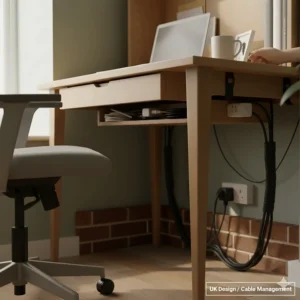
Cable Management in Tight Quarters
Limited desk space amplifies cable chaos. Effective cable management isn’t merely aesthetic—tangled cables create tripping hazards and equipment damage risks. Look for:
Cable holes in the desktop surface allow monitor, keyboard, and peripheral cables to drop cleanly underneath rather than snaking across your workspace. Two holes (rear corners) prove optimal for most setups.
Cable trays mounted beneath the desk keep power strips and excess cable loops organised and accessible for changes. Simple mesh trays work brilliantly and cost under £10.
Velcro straps or cable clips secure individual cables along desk legs, preventing that frustrating situation where your charging cable slides behind the desk every time you unplug.
Common Mistakes When Buying Compact Desks
Ignoring Load Capacity
Manufacturer weight ratings aren’t arbitrary suggestions—they represent genuine structural limits. An 80cm desk supporting 20kg might seem adequate for a laptop and notebook, but add a monitor, printer, and stack of reference books and you’ve exceeded capacity. Most quality compact desks support 25-35kg, sufficient for typical home office equipment including dual monitors.
Interestingly, many budget models advertise “suitable for desktop computers” whilst only supporting 20kg. A typical desktop PC tower weighs 8-12kg, leaving minimal capacity for peripherals. Check actual load ratings rather than marketing descriptions.
Overlooking Assembly Complexity
Assembly difficulty varies dramatically between similar-looking desks. Some manufacturers include comprehensive instructions with labelled components; others provide cryptic diagrams and unlabelled hardware. Before purchasing, check customer reviews mentioning assembly—phrases like “took three hours and required extra tools” versus “20 minutes with included Allen key” reveal important distinctions.
Pre-drilled holes should align properly, and threaded inserts should sit flush without requiring hammering. If multiple reviewers mention alignment issues or missing hardware, consider alternative models regardless of price savings.
Choosing Style Over Substance
Instagram-worthy aesthetics matter, but functional ergonomics matter more for daily use. That sleek glass-top desk might photograph beautifully, but will it provide adequate friction for your mouse? Will the transparent surface create annoying reflections during video calls?
Similarly, ultra-minimalist designs sometimes sacrifice essential features like cable management or adjustable feet. Balance aesthetic preferences with practical requirements—your workspace exists for productivity, not merely decoration.
Setting Up Your New Computer Desk Under 80cm Wide
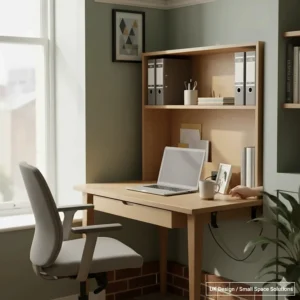
Positioning for Optimal Lighting
Natural light energises workspaces but creates challenges when positioned incorrectly. Place your desk perpendicular to windows rather than facing them directly—this prevents screen glare whilst maintaining ambient illumination. If window-facing placement proves unavoidable, invest £15-£25 in blackout or sheer curtains for glare control.
Artificial lighting should supplement rather than replace natural light. A desk lamp positioned opposite your dominant hand prevents shadows across your work area. For right-handed users, place lamps on the left side and vice versa.
Ergonomic Setup Within Limited Space
Compact dimensions needn’t compromise ergonomics. Follow these HSE-recommended guidelines for proper workstation configuration:
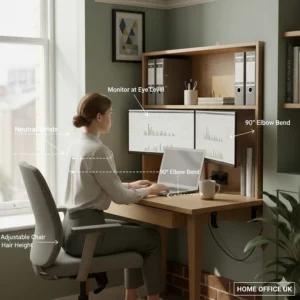
Monitor positioning: Top of screen at or slightly below eye level, approximately arm’s length distance. Use books or monitor risers if necessary—proper positioning matters more than purchasing expensive equipment.
Keyboard placement: Directly in front of you with wrists straight whilst typing. Your elbows should rest comfortably at approximately 90-110 degrees. If your desk proves too high, a cushioned wrist rest helps maintain neutral positioning.
Mouse proximity: Keep your mouse at the same height as your keyboard and within easy reach—overreaching causes shoulder strain during extended use. Consider vertical mice if you experience wrist discomfort with traditional designs.
Chair relationship: Feet flat on floor (or footrest), thighs parallel to floor, lower back supported by chair’s lumbar curve. Your compact desk dimensions don’t affect these factors—proper seating accommodates various desk heights.
Cable Organisation Strategies
Start clean and maintain clean—cable chaos accumulates gradually if left unmanaged. Route monitor, keyboard, and peripheral cables through desk cable holes, securing them with Velcro straps every 30cm along their path. Power strips belong under the desk, preferably mounted using command strips or cable clips.
Label cables at both ends using masking tape and marker—this seemingly excessive step saves tremendous frustration when troubleshooting connections or upgrading equipment. Colour-coded labels work even better for complex setups involving multiple peripherals.
Maintain 5-10cm slack in every cable to prevent tension during desk adjustments or equipment repositioning. Overly taut cables eventually pull connectors loose or damage ports.
Maintenance Tips for Longevity
Weekly Care Routine
Dust accumulates fastest around desk edges, cable entry points, and underneath peripherals. Weekly dusting with microfibre cloths prevents buildup that eventually scratches surfaces and clogs ventilation openings. For powder-coated steel frames, occasional wiping with slightly dampened cloth prevents grime accumulation in crevices.
Tighten connection points monthly—particularly important for compact desks experiencing regular equipment changes. Screws naturally loosen with vibration and movement; quarterly tightening prevents wobbling and eventual structural damage.
Surface Protection
MDF and particleboard desktops resist moisture better than solid wood but aren’t impervious. Use coasters under beverages, particularly hot coffee or tea that can penetrate protective coatings through repeated exposure. Blot spills immediately rather than wiping—wiping spreads liquid into seams and edges where damage occurs.
Desk pads or blotters protect high-use areas from keyboard and mouse friction, which gradually wears through surface finishes. They’re particularly valuable for desks with decorative wood-effect finishes that can’t easily be refinished if damaged.
Frame Maintenance
Steel frames require minimal maintenance beyond occasional cleaning, but powder coating can chip through impacts. Touch up visible chips promptly using matching spray paint—exposed steel rusts surprisingly quickly in humid UK climates, particularly coastal regions. Most manufacturers supply colour codes for purchasing matching touch-up paint.
Adjustable feet contain plastic or rubber pads that compress over time, gradually reducing stability. Replace these annually (they cost under £5 for full sets) to maintain level positioning. This small investment prevents frustration and potential equipment damage from unstable desks.
Compact Desk Alternatives Worth Considering
Wall-Mounted Fold-Down Desks
For genuinely extreme space constraints, wall-mounted fold-down desks disappear completely when not needed. Models like the HOOBRO Floating Desk fold from a functional 60x40cm workspace to just 5cm wall projection. However, installation requires locating wall studs and secure mounting—unsuitable for rental properties or plasterboard walls without additional support.
These work brilliantly in hallways, spare bedrooms, or even large walk-in cupboards, creating instant workspaces without permanent floor space commitment. Ensure your wall can support combined desk and equipment weight—typically 35-45kg total when in use.
Corner Desks with Compact Footprints
L-shaped corner desks maximise awkward corner spaces whilst maintaining compact individual sides. Several models offer 70x70cm configurations, creating generous workspace from minimal room consumption. The psychological benefit shouldn’t be underestimated—corner positioning makes compact desks feel less cramped.
However, corner desks require very specific room layouts. They work poorly in rooms with multiple doorways or windows positioned at corners. Measure your available corner carefully, including clearance for chair movement and leg room under both desk sections.
Standing Desk Converters
Rather than replacing existing furniture, standing desk converters elevate laptops or monitors to standing height atop any surface. Compact models occupy just 50x35cm, fitting atop narrow dressers or existing desks. This solution works particularly well for rental properties where permanent furniture additions aren’t practical.
Quality converters offer smooth height adjustment and sufficient stability for typing, though they sacrifice some convenience compared to dedicated standing desks. Budget £60-£120 for models with adequate build quality—cheaper versions wobble noticeably during use.
Budget Planning for Compact Home Offices
Initial Investment Breakdown
Quality computer desks under 80cm wide range from £25-£75, but consider complete workspace costs:
- Desk: £30-£60 (mid-range quality)
- Chair: £80-£150 (ergonomics matter more than desk quality)
- Lighting: £15-£35 (adjustable desk lamp)
- Cable management: £10-£20 (trays, clips, organisers)
- Accessories: £20-£40 (monitor riser, footrest, wrist rest)
Total: £155-£305 for fully functional compact workspace
This investment provides 5-10 years of comfortable daily use when quality products are selected. Prioritise proper ergonomic seating over expensive desks—your body suffers far more from poor chairs than basic desks.
Long-Term Value Considerations
Cheap desks costing under £30 typically last 2-3 years before wobbling or surface damage renders them frustrating. Mid-range options (£40-£60) easily provide 5-7 years of reliable service, making them significantly better value despite higher initial costs.
Calculate actual cost-per-year rather than purchase price when comparing options. A £50 desk lasting seven years costs £7.14 annually; a £25 desk needing replacement after three years costs £8.33 annually whilst requiring additional purchasing time and assembly effort.
Warranty and Return Policies
Amazon.co.uk returns policies provide 30-day windows for most furniture purchases, offering valuable protection against manufacturing defects or specification mismatches. However, returning assembled desks proves impractical—original packaging typically suffers damage during unboxing, and disassembly rarely allows perfect repackaging.
Before final assembly, inspect all components thoroughly. Check for surface damage, ensure hardware packages include correct quantities, and verify that pre-drilled holes align properly. Address any issues immediately whilst return windows remain active.
FAQ
❓ What's the minimum depth needed for a computer desk under 80cm wide?
❓ Can I use a standing desk converter on an 80cm wide desk?
❓ How do I prevent my compact desk from wobbling?
❓ What weight capacity do I actually need for home office use?
❓ Are folding desks genuinely practical for daily use?
Conclusion: Finding Your Perfect Compact Workspace
Selecting the right computer desk under 80cm wide for your UK home needn’t involve compromise—these seven options demonstrate that compact dimensions can deliver genuine functionality. Whether you’re prioritising the integrated charging of the HOOBRO model, the fold-away convenience of the Harbour Housewares desk, or the unbeatable value of the Oypla Industrial option, each delivers specific benefits suited to different working styles and space constraints.
Remember that your desk represents just one component of an effective home office. Proper ergonomic seating, adequate lighting, and thoughtful cable management contribute equally to comfortable, productive workspaces. Invest in quality where it matters most—typically seating and positioning rather than desk materials—whilst selecting compact desks that meet your genuine functional requirements.
The UK’s challenging housing market makes efficient space utilisation increasingly essential, but cramped needn’t mean uncomfortable. These computer desks under 80cm wide prove that thoughtful design delivers full functionality within modest footprints. Your perfect compact workspace awaits somewhere in this selection—choose wisely, set up properly, and enjoy years of comfortable, productive home working.
Recommended for You
- Best White Corner Computer Desk UK: 7 Top Picks for 2026
- 7 Best Corner Desk for Small Home Offices UK 2026
- 7 Best Small Corner Computer Desk UK Under 100 | 2026 Guide
Disclaimer: This article contains affiliate links. If you purchase products through these links, we may earn a small commission at no additional cost to you. Prices shown are approximate and may vary.
✨ Found this helpful? Share it with your mates! 💬🤗
